No shortcuts. 13 modules · 69 lessons · 100% free. Learn to contribute accurate and neutral content, edit within established Wikipedia policies using reliable sources — and make a measurable impact on the world's most-read encyclopedia.
Module 0 · Before Anything Else
Read This First. Before Module 1. Before Everything.
This isn't a pep talk. It's a gut-check. Most new editors quit after their first revert because nobody told them how Wikipedia actually works. Don't be them.
Wikipedia is a free encyclopedia written by volunteers in hundreds of languages. Anyone can edit it. Launched in 2001, it is hosted by the nonprofit Wikimedia Foundation to make knowledge freely available.
Five pillars to remember
Encyclopedia: summarise published knowledge.
Neutrality: represent significant views in proportion to reliable sources.
Free content: respect copyright and reuse licences.
Civility: treat other editors respectfully.
No firm rules: use judgement to improve the encyclopedia—not as an excuse to ignore its principles.
Many people ask what practical steps they can take about misinformation online. One is learning to edit Wikipedia well, since it shapes what search engines and AI tools present as fact.
Don't cite Wikipedia. Write Wikipedia. Wikipedia is a tertiary source — a summary of other sources — so it's not something you cite in an essay. It is, however, something you can make better.
Anyone can edit Wikipedia. Not everyone should edit it the way they first want to. Read this before you invest another minute.
The real requirements (not the pretty version)
📚
Read before writing. — Find published sources instead of relying on personal knowledge.
🧊
Thick skin. — Your edits will be changed, questioned, and sometimes undone by strangers. That's the system working, not an attack.
⚖️
Ability to write about things you care about without taking sides. — If you can't describe the view you disagree with in words its holders would accept, stay away from that topic for now.
🚫
No agenda to promote. — Yourself, your company, your client, your cause. Wikipedia is not a platform. Editors with a conflict of interest have a separate, slower path (Lesson 5 of Module 5).
💻
A laptop or desktop with internet access. — Use a computer for this course so you can comfortably edit, check sources, and review your changes.
The honest self-check
Nobody can see your answers. Just you:
When you read a surprising claim, do you look for where it came from?
Can you accept "your source isn't good enough" without arguing about whether the claim is true?
Can you let someone else have the last word on a talk page?
Are you willing to make small, boring, useful edits before you write anything big?
Start small: improve existing articles before creating new ones. Learn the policies, practise, then tackle larger projects.
❌ What people imagine
"I'll write the definitive article on my favourite topic."
"I'll fix all the bias in that controversial article."
"I know this field — I don't need sources."
"I'll add my organisation's page."
✓ What actually happens
Experienced editors spend most of their time adding citations, fixing wording, and expanding articles one sourced paragraph at a time.
Controversial articles are the last place to start — many are locked to new accounts.
Experts are valued for knowing where the good sources are, not for their own authority.
Writing about your own organisation is a conflict of interest; it goes through a request process.
A real editing session
FIND
Open a Citation Hunt snippet, an article on your watchlist, or something you read today that looked out of date.
READ
Find a reliable source first. Read the relevant part properly. If you can't find a source, you haven't found something Wikipedia can say — move on.
WRITE
One or two sentences, in your own words, neutral tone, citation attached. Preview. Edit summary. Publish.
FOLLOW
Add the article to your watchlist. If someone changes or reverts your edit, read their reason before responding.
Expect setbacks. Reverts and unsuitable sources are part of learning. Read the feedback and improve your next edit.
Killer #1 — No source
Cite a reliable published source. If your addition is challenged, you must provide support; personal expertise is not a citation.
Killer #2 — Not neutral
Avoid praise or judgement such as “acclaimed” or “critics rightly argue.” Describe disputes neutrally.
Killer #3 — Conflict of interest or promotion
Connected to the subject? Disclose your connection and request changes on its talk page. See Module 5, Lesson 7.
The rule
Before editing: Is it sourced? Is it fair? Am I connected to the subject?
Four more beginner mistakes (and the fix)
📖
Editing without reading the article first. — Read the full article and its Talk page before changing anything. The thing you want to add may already be there, or may have been discussed and rejected.
📋
Copy-pasting from another website. — Even one sentence is a copyright violation and will be removed. Rewrite in your own words.
💾
Many tiny saves instead of one solid edit. — Batch your changes to a section into one publish. It keeps the page history clean and meaningful.
🔁
Ignoring a revert and re-adding the same content. — Go to the Talk page. Discuss first — don't start an edit war.
Quick quiz
A new editor adds to a musician's article: "She is a legendary performer who inspired a generation." No citation. The editor is the musician's niece. How many of the three killers are present?
Ten reminders from Wikipedia 101. Modules 1–4 explain the policies behind them.
1
Use only one account. Editing under multiple accounts to mislead or boost your own position is forbidden and can get all of them blocked. One username, for transparency.
2
Never vandalise pages. Nonsense, jokes, or malicious edits lead to an immediate, indefinite block. Always contribute constructively.
3
Don't fight over edits. Repeatedly undoing others' work — an edit war — gets you blocked. If someone reverts you, don't just re-add it; discuss on the article's talk page.
4
Provide edit summaries. Briefly explain what you changed and why, every time.
5
No spam or self-promotion. Wikipedia is an encyclopedia, not a marketing platform. Don't edit articles where you have a personal stake — your company, your band, yourself.
6
Stick to neutral, fact-based content. No personal bias, no personal opinions or original ideas. Let published evidence speak, not your agenda. (Modules 1 and 3)
7
Cite reliable sources. Every important claim needs a citation to a trustworthy source — books, reputable websites, newspapers. Unsourced material can be removed. (Modules 2 and 4)
8
Respect copyright. Never copy-paste text or images from other websites, books, or sources. Write in your own words or use freely licensed content. Copying is spotted and removed. (Module 6, Lesson 3)
9
Be civil and polite. Focus on the content, not the person. Name-calling, insults, and personal attacks lead to warnings or blocks.
10
Collaborate and communicate. Work with others, not against them. Use talk pages, assume good faith, build consensus. It keeps you out of trouble far better than fighting over content.
Quick quiz
Another editor reverts your well-intentioned edit. Which commandment tells you what to do next?
Do these before Module 1. All free, all take under 15 minutes total.
Create your Wikipedia account
An account gives you a consistent username, an editing history, a watchlist, and a user talk page.
1
Turn off your VPN. Wikipedia often blocks account creation from VPN or proxy connections.
2
Open Wikipedia. Go to wikipedia.org and select English.
3
Click Create account at the top right on desktop, or use the direct sign-up link.
4
Choose a neutral username. We recommend a nickname, such as lattegirl or bluecup20, rather than your real name. Accounts are for individuals: avoid organisation names, promotion, or impersonation.
5
Create a strong, unique password. Enter it again to confirm.
6
Add an email address. Optional, but recommended for password recovery and email notifications. Consider a separate address for Wikipedia.
Complete the CAPTCHA if prompted, then click Create your account. If you added an email, confirm it using the verification message.
Privacy tip: if your email contains your real name, consider a separate address without it. Wikipedia does not display your registered email publicly, but sending email to another editor through Wikipedia reveals your address to that recipient.
Optional: add a user page later
📝
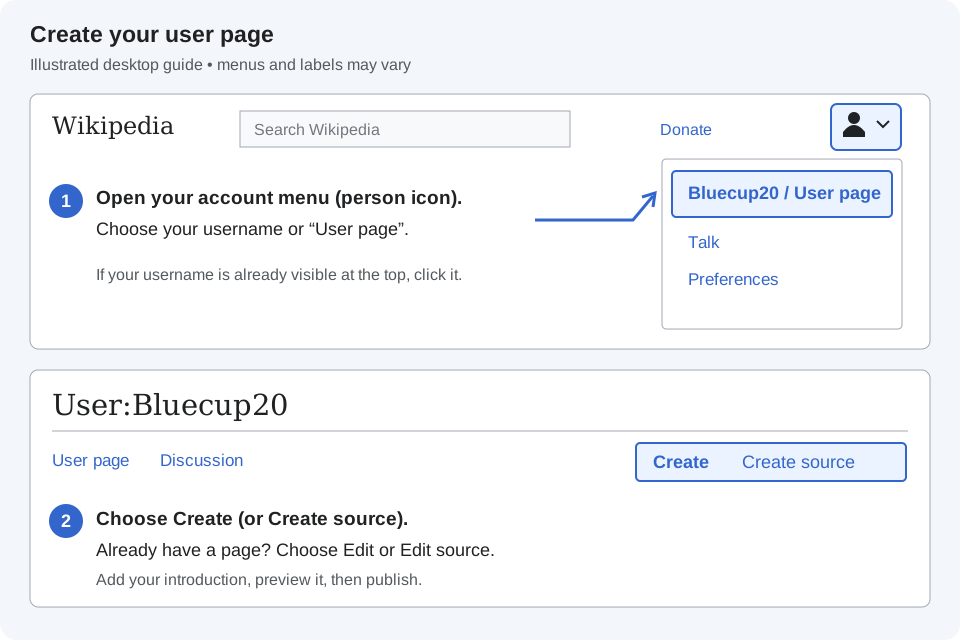
Your user page can wait — You do not need to create one immediately or before editing. When ready, click your username at the top right, or the User page tab on your Homepage. Choose Create or Create source for a new page, or Edit for an existing one.
Where to click: account menu → User page → Create or Edit. Simplified illustration; your layout may differ. Click to enlarge. You can also open your user page directly while logged in.
Write two or three sentences, preview, then publish. You can create an editing persona with a nickname and interests—no real name, age, photo, or location needed. Choose what to share, but keep it relevant to Wikipedia and do not impersonate someone or invent credentials. Disclose relevant affiliations and paid roles.
Example: “Hi, I’m Bluecup20. I enjoy history and books, and I’m learning to improve citations and fix typos.” Your user page is public.
Your tools
🖊️
Enable VisualEditor — Preferences → Editing → Editing mode: "Show me both editor tabs". VisualEditor works like a word processor and builds citations for you. You'll learn source mode later.
📝
If you want to create an article — draft it in Word or Google Docs. We don’t recommend using Wikipedia’s sandbox for drafting because it is public.
⭐
Know where your watchlist is — The star icon on any article adds it to Special:Watchlist, so you see when it changes.
Bookmarks you'll use every week
☕
The Teahouse — WP:TEAHOUSE, the friendly help desk for new editors. No question is too basic.
📋
The perennial sources list — WP:RSP, the community's verdict on hundreds of commonly cited outlets.
🎯
Citation Hunt — citationhunt.toolforge.org serves up unsourced sentences for you to fix. The easiest measurable impact there is.
Types of users — what you unlock as you go
User type
Requirement
What you can do
IP (anonymous)
No account
Edit most articles; your IP address is shown publicly in the history. Can't create pages or upload files.
Registered
Create an account
Edit under a username, get a watchlist, sandbox, user page, and talk page. New articles go through Articles for Creation.
Edit extended-confirmed-protected pages, including many contentious topics.
New accounts: start with unprotected articles. Use Articles for Creation for new drafts if you cannot create articles directly.
Why can’t I edit this page?
Page protection limits editing to prevent disruption. Semi-protected pages restrict new accounts; pending changes may need review before appearing to logged-out readers. Check the protection notice and use the talk page to request a change.
Wikipedia doesn't take sides. It describes what reliable sources say, in proportion to how much they say it. This is the policy most new editors break without noticing.
The policy
Articles must represent fairly, proportionately, and as far as possible without editorial bias, all the significant views that have been published by reliable sources on a topic.
Three words carry the weight:
⚖️
Fairly — each view described in terms its holders would recognise, not a strawman.
📏
Proportionately — space given to each view matches its prominence in reliable sources — not how loud its supporters are.
🔇
Without editorial bias — Wikipedia's own voice never cheers for a side. Tone, word choice, and structure all count.
What NPOV is not
Not "no point of view". When sources agree, say it plainly. "The Earth is about 4.5 billion years old" needs no "according to some scientists".
Not "equal time". Fringe views aren't entitled to balance. False balance is itself a neutrality failure.
Not a reason to remove sourced criticism. If reliable sources cover a controversy, the article covers it — in proportion.
Not fixed by "allegedly". Hedging words don't make an unsupported claim neutral. A source does.
Neutrality applies everywhere: text, images, headings, and content choices. Local editor agreement cannot override it.
When sources disagree, name who holds each view and cite them. This is attribution.
❌ Asserted in Wikipedia's voice
The policy was a disaster for small businesses.
✓ Attributed and cited
The Federation of Small Businesses said the policy had "severely harmed" its members,[1] while the Treasury reported that small-business closures fell over the period.[2]
❌ Asserted
The film is a masterpiece of modern cinema.
✓ Attributed
The film received widespread critical acclaim; on Rotten Tomatoes it holds a 96% approval rating from 212 reviews.[3]
The two tests
1
Is it seriously contested by reliable sources? If yes, attribute it ("According to…"). If no — if it's an uncontested fact — state it directly.
2
Is it an opinion at all? "Best", "important", "controversial", "influential" are judgements. Either attribute them to a named source or replace them with a checkable fact.
Practice
Rewrite this sentence so it would survive on Wikipedia: "The senator's brilliant speech obviously won over the crowd, though critics claimed it was empty rhetoric." Invent a plausible named source if you need to.
Puffery — legendary, acclaimed, world-class, renowned, iconic, visionary, award-winning. Replace with the fact: which award, which critic, what sales figure.
🐍
Weasel words — some say, many believe, it is widely thought, experts agree, critics claim. Who, exactly? Name them and cite them.
🎭
Doubt-casting verbs — claimed, so-called, purported, admitted, revealed, pointed out. "Claimed" implies they're lying; "revealed" implies it's true. Use said, stated, wrote, according to.
🏷️
Contentious labels — cult, terrorist, extremist, denialist, pseudoscience, racist. Use only when widely used by reliable sources, and attribute in-text.
📣
Editorialising — obviously, clearly, of course, notably, it should be noted, unfortunately, interestingly. Delete them. The facts can stand alone.
⏳
Relative time — recently, currently, now, in recent years. Articles are read for years. Write "as of 2024" or "in March 2024".
Quick quiz
Which verb is safe to use in Wikipedia's voice when reporting what a politician told a newspaper?
Being neutral does not mean giving every opinion equal space. Give more attention to views that reliable sources treat as important.
The simple rule
Follow the sources—not your personal preference. Wikipedia calls this due weight.
What to do
Main views: explain them most fully when reliable sources give them the strongest coverage and support.
Other significant views: include them, with less space when sources give them less attention.
Little-supported claims: do not add them just to show “both sides.” Some do not belong at all.
Example
Reliable histories of a museum focus on its collection and only briefly mention a ticket-price dispute. The Wikipedia article should not make that dispute its main story—even if you can cite it.
Before publishing: does your addition make a small issue look bigger than reliable sources do? Check its length, heading, and placement.
You can care about a topic. Write so that readers who disagree with you can still call it fair.
Three practical tricks
1
Write the other side first. If you can state the view you disagree with in words its holders would accept, you're writing neutrally.
2
Cite the strongest source for every position — not the weakest one for the side you dislike.
3
Let the facts do the work. If the evidence is lopsided, a neutral summary of it will be lopsided too. You don't need adjectives.
Quick quiz
Which sentence is neutral?
Before you publish — NPOV checklist
Check: attributed opinions, reliable citations, proportional coverage, and neutral wording.
Readers must be able to check that what Wikipedia says comes from a reliable published source. If you add it, you must be able to cite it. No exceptions for experts.
The policy
Article content must be verifiable in reliable published sources. Personal knowledge alone is not enough.
Not every sentence needs a footnote, but every factual claim needs support in published sources.
🎒
WP:BURDEN — If you add or restore material, you are responsible for the citation. Anyone may remove uncited material; it shouldn't go back without a source.
🧠
"I'm sure it's true" is not a citation. — Neither is "it's common knowledge in the field" or "I was there". Wikipedia can't verify your memory.
🔁
Verifiability cuts both ways. — Something true but unverifiable can't go in — yet. Something verifiable isn't automatically required; it still needs due weight.
Real scenario
You know a date from an unpublished parish register. Find a reliable published history or transcription that confirms it; your own archival research is not enough.
Practical rule: find the source first, then write the sentence from the source. Editors who write first and look for sources afterwards end up with sentences no source quite supports.
An inline citation — a footnote right after the sentence — is mandatory for:
💬
All quotations — every direct quote, no matter how short.
❓
Anything challenged or likely to be challenged — if it would surprise you, it will surprise someone else.
🧑
Any contentious material about a living person — this is removed immediately if unsourced, not tagged. See WP:BLP.
📊
Statistics, dates, figures, and rankings — numbers without sources are the first thing reviewers remove.
Add citations as you write. Make clear which source supports each claim, especially material likely to be challenged.
Quick quiz
Which of these can you most safely add without an inline citation?
Assess the work, author, and publisher. Prefer independent published sources with a reputation for accuracy. Module 4 explains how.
Self-published books, personal blogs, personal websites
Broadsheet newspapers, news agencies, scholarly society magazines
Tabloids, clickbait sites, content farms
Official reports from governments and recognised organisations
Press releases and marketing (beyond basic facts)
The subject's own site, for uncontroversial facts about itself
Social media, forums, Reddit, YouTube comments, user-generated databases (IMDb, Find a Grave)
Offline and paywalled sources are allowed. Readers must be able to locate and check them. Eligible editors can use The Wikipedia Library.
Cite what you actually read. Don't copy citations from another article or from a source's own bibliography. If you only saw a source quoted in another source, cite it as "quoted in" — WP:SAYWHEREYOUREADIT.
In VisualEditor (recommended)
1
Open the article, select Edit, and place your cursor after the punctuation of the sentence you're supporting.
2
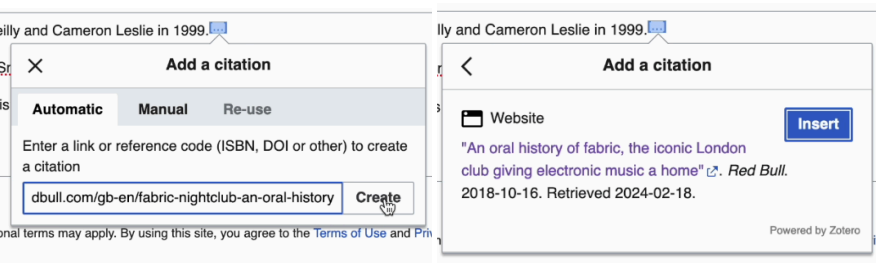
Select Cite from the toolbar. Choose Automatic, Manual, or Re-use.
3
For Automatic, paste a URL, DOI, ISBN, PMID, or article title and select Generate. Wikipedia builds the citation.
4
Review the fields — automatic lookups sometimes miss the author or date — then Insert.
5
If lookup fails, enter the publication details under Manual.
6
Publish changes with a brief edit summary. Wikipedia handles the citation style and the reference list for you.
In source mode
The same citation in wikitext looks like this. Common templates: {{cite web}}, {{cite news}}, {{cite book}}, {{cite journal}}.
Template — inline citation
The bridge opened in March 1932.<ref>{{cite news |last=Smith |first=Jane |title=Harbour Bridge opened |newspaper=The Sydney Morning Herald |date=20 March 1932 |page=1 |url=https://example.org/article |access-date=28 October 2026}}</ref>
Template — references section (once per article, usually already there)
== References ==
{{reflist}}
Re-using a source: give the first use a name — <ref name="smith1932">…</ref> — then re-use it with <ref name="smith1932" />. In VisualEditor, that's the Re-use tab.
Practice
Write a source-mode citation for a web page. It must use <ref> tags, a {{cite web}} template, a |title=, and a |url=. Make up the details.
The threshold for inclusion on Wikipedia is verifiability. That produces situations that feel wrong but aren't:
🔒
A source seems wrong? — Find better published evidence. Explain significant disagreements with appropriate citations.
🗑️
Your true, unsourced sentence is removed. — Don't restore it as-is. Add it back with a citation and say so in the edit summary. If the other editor still objects, go to the talk page.
📰
Verifiable doesn't mean must-include. — A sourced fact can still be trivial, undue, or non-encyclopedic. Verifiability is the entry ticket, not the whole test.
Quick quiz
An editor removes your sentence with the summary "unsourced". You know it's correct. What next?
Before you publish — Verifiability checklist
Read each source. Check that it supports your exact claim. Cite challenged claims and use high-quality sources for contentious material about living people.
Wikipedia doesn't publish your conclusions — even good ones. If no reliable source has said it, Wikipedia can't say it either. This is the policy that catches experts.
The policy
"Original research" means facts, allegations, ideas, analyses, or conclusions for which no reliable, published source exists — including any analysis or synthesis of published material that reaches a conclusion the sources don't state.
Use expertise to find and summarise sources—not to publish your own conclusions. If nobody has published it, leave it out.
Things that are original research
Your own analysis of a court ruling, a dataset, or a novel.
A conclusion drawn from reading several studies ("the evidence shows…").
A correction to a source based on your own knowledge or calculations.
"I interviewed the subject" or "I work there".
A chart or diagram you made to illustrate an unpublished idea.
Real scenario
Explaining what a court judgment “means for tenants” is legal analysis. Cite a reliable published analysis rather than interpreting the judgment yourself.
Synthesis combines sourced facts into a conclusion the sources do not state. That is original research.
❌ Synthesis
The UN estimates 160,000 deaths from the conflict.[1] The Smith Report, which the UN relied on, has been criticised for double-counting.[2] The UN figure is therefore likely exaggerated.
✓ Not synthesis
The UN estimates 160,000 deaths from the conflict.[1] Historian Jane Doe has argued the figure is likely exaggerated because it relies on the Smith Report, which she says double-counts.[3]
The difference: in the second version a source drew the conclusion and the article attributes it. In the first, the editor drew it.
Warning words:therefore, this shows that, which means, so, consequently, suggesting that. When you type one of these, stop and ask: which source says this?
Quick quiz
"The council introduced the parking charge in 2019.[1] Footfall in the high street fell 12% in 2020.[2]" — placed together in a section titled "Impact of the parking charge". Is this original research?
Base articles mainly on secondary sources. Know these three types:
Type
What it is
Examples
How to use it
Primary
Original material close to an event; raw data; first-hand accounts
Court filings, interviews, diaries, census tables, original research papers, a company's own website, tweets, the text of a novel
Only for plain descriptive statements any educated reader could verify. Never for interpretation.
Secondary
Someone else's analysis or synthesis of primary sources
Scholarly books and review articles, investigative journalism, biographies, history books, criticism
The backbone of articles. Use for interpretation, significance, and context.
Useful for overviews and judging due weight. Wikipedia itself is never a source.
Do not supply your own analysis. Cite a systematic review for treatment conclusions or a published analyst for financial interpretations.
Plain description vs. interpretation
"The novel is set in Dublin on 16 June 1904" — fine; anyone can check the text. "The novel's setting reflects Joyce's ambivalence about Ireland" — needs a critic who said so.
New editors sometimes over-correct and become afraid to write anything. These are all fine:
🧮
Routine calculations — adding figures, converting units, working out someone's age from their birth date — if the result is obvious and uncontroversial (WP:CALC).
🌐
Translating — faithfully, from a source in another language.
✂️
Summarising a source in your own words — that's exactly what you're supposed to do. Copying is the problem, not paraphrasing.
📷
Photographs you took — welcome, and encouraged. Upload them to Wikimedia Commons. (Photos you didn't take can't be uploaded by you — ask the photographer or archive.)
🗂️
Choosing what to include — guided by due weight in secondary sources.
Quick quiz
A politician's official bio says she was born in 1970; a newspaper profile says 1972. Can you write "sources differ on her birth year" with both citations?
Before you publish — NOR checklist
Check: do sources state your conclusions, or have you added your own interpretation?
The guideline that underpins all three policies. Reliability isn't a property of a source on its own — it depends on the claim you want it to support.
The guideline
Articles should be based on reliable, independent, published sources with a reputation for fact-checking and accuracy. The question is always: is this source reliable for this statement, in this article?
⚽
A tabloid — may be reliable for the date a football match was played, and unreliable for a claim about a politician's private life.
🏢
A company's website — is reliable for its founding date, and unreliable for "the industry's leading provider".
🧪
A single scientific study — is reliable for "a 2021 study found…", and unreliable for "the treatment works".
🎤
An interview — is reliable for what the interviewee said, and unreliable for whether it's true.
Start with academic books, reputable journals, and established news outlets. Choose sources suited to the claim; institutional publicity needs independent support.
Evaluate all three. Any one of them can make a source reliable — or unreliable — for a given claim.
1
The work. Is it reporting, an opinion column, a press release, a peer-reviewed study, a preprint, sponsored content? Is it current? Opinion pieces are reliable only for the author's opinion, with attribution.
2
The author. Named? An established expert in this subject, with work previously published by reliable third parties? A Nobel physicist is not an expert on nutrition. "Staff" or "admin" is a warning sign.
3
The publisher. Editorial oversight? A reputation for accuracy and for issuing corrections? University presses, major news organisations, and peer-reviewed journals have it. Self-publishing platforms don't.
Real scenario
A recognised economist’s self-published budget analysis may support their attributed opinion if they have relevant reputable publications. Do not use it for claims about other living people.
Strength
Source type
Notes
Strongest
Peer-reviewed review articles and meta-analyses; scholarly monographs from academic publishers; standard textbooks
Preferred for science, medicine (WP:MEDRS), history, anything academic.
Strong
Reputable broadsheet newspapers and news agencies; quality magazines; books from established publishers
Good for current events, biographies, culture. Check it's reporting, not opinion.
Context-dependent
Trade press; specialist websites; government and NGO reports; individual primary research papers
Often reliable within their remit; careful with analysis and advocacy.
Weak
Local news with thin oversight; interviews (for the interviewee's views); the subject's official site
Fine for uncontroversial, non-promotional facts about the subject itself.
Avoid, especially for anything contested or about living people.
Not usable
Wikipedia and its mirrors; other wikis; social media; forums; blogs and self-published sites (except by recognised experts); IMDb, Find a Grave, Goodreads, Discogs; AI-generated text
Non-English sources are allowed. Prefer English only when quality is equal.
Check WP:RSP for community assessments of frequently discussed sources:
🟢
Generally reliable — use normally, with ordinary judgement.
🟡
No consensus / additional considerations — reliable for some things, not others. Read the summary.
🔴
Generally unreliable — don't use except in narrow cases.
⛔
Deprecated or blacklisted — don't use at all. Adding it may be reverted automatically.
Tool — look up a source on the perennial list
Search an outlet or website. The list loads from Wikipedia and is cached for a week.
Not on the list? Most sources aren't. Apply the work/author/publisher test. Still unsure? Ask at the Reliable sources noticeboard (WP:RSN) — give the source, the article, and the exact claim.
Quick quiz
Which of these is deprecated on English Wikipedia — not to be cited at all?
Bookmark these tools for finding reliable sources.
📰
Free English newspaper sources — a curated list of reputable newspapers you can read without a paywall. WP:Free English newspaper sources
Digital library projects — Internet Archive, HathiTrust, Project Gutenberg, national libraries and more. List of digital library projects
🎓
Google Scholar — search academic papers; look for the "[PDF]" link on the right for free full text. scholar.google.com
📋
Perennial sources list — the community's verdict on commonly cited outlets (previous lesson). WP:RSP
📚
The Wikipedia Library — free access to JSTOR, Oxford, Cambridge, ProQuest, newspaper archives and dozens more — for accounts at least 6 months old with 500 edits. wikipedialibrary.wmflabs.org
🙋
Resource Request — not eligible for the Library yet? Ask an editor who is to look something up for you. WP:RX
Search habit that works
Search for the subject, read the sources, then write. Searching only for evidence that agrees with you risks cherry-picking.
Special cases you'll meet early
🧑⚕️
Medicine and health (WP:MEDRS) — biomedical claims need secondary sources: systematic reviews, meta-analyses, clinical guidelines, major textbooks. Not individual studies, not news coverage of studies.
🪞
Sources about themselves (WP:ABOUTSELF) — a subject's own site or social media can support uncontroversial facts about the subject — if not unduly self-serving, not about third parties, and not the basis of the whole article.
✍️
Self-published experts — usable if the author's work in the same field has previously been published by reliable independent outlets. Never for claims about living people.
📅
Age of sources — prefer recent for science, technology, statistics, current affairs. Older scholarship may still be standard in history — but check it hasn't been superseded.
📐
Notability — a topic earns its own article only with significant coverage in reliable sources independent of the subject (WP:N). Press releases, directories and passing mentions don't count. Find those sources before you draft.
Practice
A startup raised $20 million. Which source would you cite: A its press release, B Reuters, or C an employee’s Reddit post? Explain briefly.
Before you cite — RS checklist
Reliable for this claim? Checked WP:RSP? Reporting, not opinion / press release / sponsored? Independent of the subject? For health, living people, or contested claims: the strongest available source?
The goal: one small, well-sourced edit that stays. You'll make it live during this module, not after it.
Use VisualEditor on a laptop or desktop. Start with spelling, grammar, or punctuation.
Visual vs. source
VisualEditor
Source editor
Looks like a word processor. Best for beginners and for citations (paste a URL, it builds the reference).
Raw wikitext. Best for templates, tables, and precise control. What most experienced editors use.
Draft longer changes in Word first. Review and add an edit summary before publishing.
Want a guided tour? The Wikipedia Adventure is an interactive tutorial that takes about an hour.
Wikipedia offers two built-in ways to find content that has already been identified as needing attention: Suggested edits and the Task Center.
Suggested edits (on your Homepage)
Open Special:Homepage. Filter Suggested edits by topic and difficulty, then choose one small task.
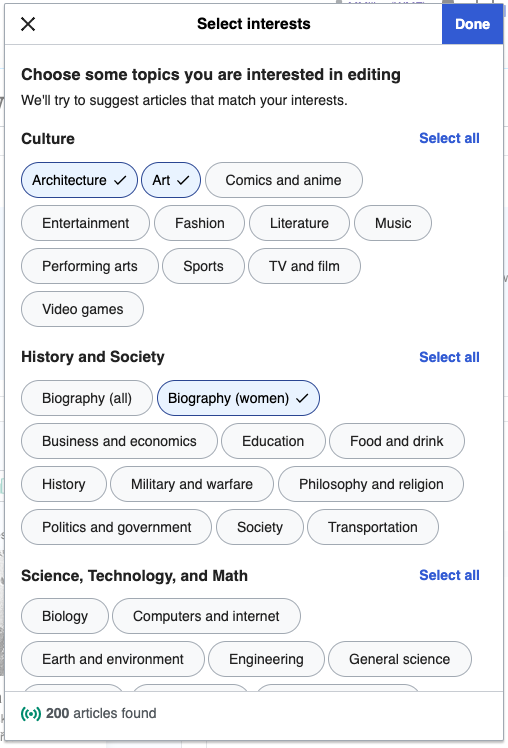
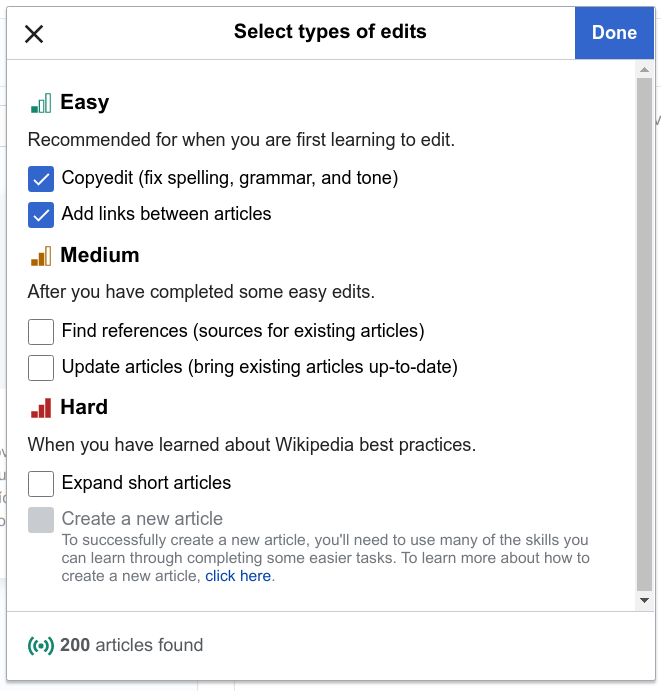
Choose your topics: open the interests or topics filter, select subjects you know or want to work on, then click Done to see matching suggestions. You can select more than one topic. Click the image to enlarge. Example screenshot from 2020; today’s layout and topic names may differ. Image: MMiller (WMF), Wikimedia Commons · CC BY-SA 4.0 · Unmodified.Choose your task level: start with Easy tasks such as spelling and grammar corrections. Click the image to enlarge. Example screenshot from 2019; today’s layout and available tasks may differ. Image: Trizek (WMF), Wikimedia Commons · CC BY-SA 4.0 · Unmodified.
1
Open the Homepage (click your username → Homepage, or the link above).
2
Choose Suggested edits.
3
Pick a topic you know something about.
4
Choose a task level — start with "Easy" (copyedit, add links).
5
Read the section in context before changing anything.
6
Make one careful change.
7
Add a clear edit summary and publish.
Check each suggestion. Automated links can be wrong; an unsourced sentence may need removal. Read the context before editing.
The Task Center
Browse the Task Center for more work: fact-checking, copy-editing, translation, and article improvement.
✓ Good early choices
Fact-checking
Copy editing
Categorisation
Translation
Short-article expansion
⏳ Needs more experience
Anti-vandalism
New pages patrol
Image copyright work
Merging and splitting
Conflict resolution
Choosing between them
Start with Suggested edits for guidance. Explore the Task Center as you gain confidence.
Before publishing — four questions
Is the change useful?
Is the wording neutral?
Is the context understood?
Is a source needed?
Then add a short edit summary.
Quick quiz
Suggested edits proposes linking the word "Mercury" in an article about a car to the planet Mercury. What do you do?
Types of edits — improve articles by focusing on
Fix
Spelling and grammar
Punctuation
Connect
Internal links to related articles
Citations to reliable sources
Add
Missing or additional content
Out-of-date facts, with a source
Group related corrections. Fix spelling, grammar, and punctuation together. Our community suggests 20+ characters added, removed, or replaced. Wikipedia has no minimum: one useful correction is valid. Never pad an edit.
Topic ideas — start with what you know
Pick a subject you already read about for fun. You'll spot errors and gaps faster, and you'll know where the good sources are.
Add links between articles — a biography of a vaccine's inventor should link to and from the article on the disease. Articles with no incoming links are "orphans" that readers can't find. Simple, and genuinely useful.
✏️
Copyedit — fix typos and grammar; split an over-long sentence. Writing on Wikipedia should be accessible, simple, and clear.
📎
Add a citation to a [citation needed] sentence — Citation Hunt serves these at random, filterable by topic.
🔄
Update an out-of-date figure — population, CEO, latest release — with a source, and "as of [date]".
➕
Add a missing fact — one or two sentences from a reliable source you've read.
📈
Expand a stub — a very short article, with one well-sourced paragraph.
Avoid for now: creating new articles; contentious topics; biographies of living people; anything where you have a conflict of interest; and copying text from anywhere — even one sentence is a copyright violation and will be removed.
Source first
For new facts, open the reliable source first. Summarise it in your own words.
Add links that help readers understand the subject. Avoid unnecessary links.
The golden rule
Ask: "Would reading the linked article help someone understand this article?" If yes, link. If no, don't.
How to add a link in VisualEditor
1
Highlight the text you want to turn into a link.
2
Click the chain icon 🔗 in the toolbar (or press Ctrl/Cmd+K).
3
To link to another Wikipedia article, type the article name and pick it from the suggestions. To link to an external website, paste the full URL.
4
Click Done or press Enter. The text turns blue. Click the link again to Edit or Remove it.
✓ Do link
First occurrence only — the first time a term appears in the lead, and again the first time in the body.
Relevant connections — people, events, and topics that help readers understand the article.
Technical terms and jargon a general reader may not know.
Table cells and image captions — even if linked earlier in the article.
✗ Don't link
Everything — overlinking makes articles harder to read.
Everyday words understood by most readers in context.
Dates and years — unless the date has a significant connection to the subject.
Major places everyone knows — United States, London, France.
The same term more than once in the same section.
Important linking guidelines
🎯
Check the destination — Match the meaning in context. “Mercury” could mean a planet or an element.
💬
No links inside quotations — if needed, link the term just before or after the quote instead.
🌐
External links don't go inline — websites used as sources belong in the References section, not linked in the article body.
🔤
Neutral link text only — never "click here" or "this link" as the visible text.
🔴
Red links are OK — a red link means the target article doesn't exist yet. Add one if the topic deserves its own article; it signals a gap for other editors to fill.
📖
The article must make sense without the link — readers may be offline or printing. Never rely on a link for meaning, and don't colour or style links.
In a biography that says "She moved to London in 1962 and began studying mycorrhizal fungi. Her work on mycorrhizal fungi…", which term should be linked?
1
Open the article. Click Edit at the top — or the pencil beside a section heading to edit only that section.
2
Make your change. One fix per edit. Keep it minimal.
3
Cursor after the punctuation → Cite → paste URL/DOI/ISBN → Generate → check fields → Insert.
4
If you're replacing a [citation needed] tag, delete the tag.
5
Preview. Check the citation appears in References and the text reads correctly.
6
Write an edit summary, then Publish changes. It's live immediately — there's no approval queue on most articles.
Edit summaries
Write a short, specific edit summary so others understand your change:
Examples
Fixed typo in lead
Added citation to Guardian article for 2023 figure; removed cn tag
Updated population to 2021 census per ONS
Added sentence on 2019 merger, cited FT
Wikilinked "Edinburgh" and "Royal Society"
Leave “This is a minor edit” unticked. This is our community’s recommendation, not a Wikipedia requirement. Add a clear edit summary.
Practice
You just added a sentence about a museum's 2022 reopening, cited to a BBC article, and removed a [citation needed] tag from the previous sentence. Write the edit summary.
Congratulations — you're a Wikipedian
Check your edit in My Contributions. Click the article’s star to watch it. Fix mistakes with another edit.
Read the revert reason and discuss it on the talk page. Do not repeatedly restore your edit: edit warring can lead to blocks.
1
Read the reason. Most reverts of new editors are about sourcing or neutrality — Modules 1–4.
2
If you think they're wrong, go to the article's Talk page (add "Talk:" before the title, e.g. Talk:Scotland), start a new topic, explain your edit politely, and ask what would make it acceptable.
3
Sign with four tildes — ~~~~ — which becomes your username and a timestamp.
The banners at the top show which WikiProjects cover the article — a good place to find editors working on similar topics.
Someone may message your talk page — you'll see a notification at the top of the screen.
Practice
Your sourced sentence was reverted with the summary "undue". Write the talk-page message you'd post. Be polite, specific about your source, ask a question — and sign it.
Writing about yourself, family, an employer, or a client? Disclose the connection and request changes on the talk page rather than editing directly.
You can still get the article improved. This is the route:
1
Declare your connection. On your user page, and in every request. If you're paid — by an employer or client — disclosure is mandatory, not optional.
2
Go to the article's Talk page and post a request using the {{edit COI}} template.
3
Be specific. Say exactly what should change — ideally the proposed wording — broken into clear points.
4
Provide reliable, independent sources for every change. Newspapers, academic publications, official reports.
5
Be patient. Editors are volunteers; complex requests take time.
Template — COI edit request
== Edit request: update founding date ==
{{edit COI}}
I am an employee of Example Ltd and have a conflict of interest (declared on my user page).

The article currently says the company was founded in 1998. According to the Companies House record and this Financial Times profile, it was 1996:
* https://example.org/companies-house-record
* https://example.org/ft-profile

Could an independent editor change "1998" to "1996" in the first sentence and add these as citations? Thank you. ~~~~
For biographies of living people with serious errors, you can also raise it at the BLP noticeboard. Discussions there are public and move fast.
Commons is different. On Wikimedia Commons you can upload images related to your institution or people you know — the conflict-of-interest threshold is lower there. See the Commons module.
Beginner
Find a Stub article or a topic you know well.
Add at least one sentence with a proper citation.
Save your edit with a clear summary message.
Intermediate
Add 2 or more citations using VisualEditor.
Check the Talk page for any ongoing discussions.
Add one wikilink that helps readers.
Challenge
Find an article with a neutrality issue.
Rewrite one biased paragraph in NPOV style.
Leave a message on the Talk page explaining your change.
Keep editing. Keep growing.
Edit at least once a week to build a streak. Aim for autoconfirmed status (10 edits + 4 days). Bring a question to the next session. The Teahouse is open any time — and so is the community group you're in.
You've made small edits. This module takes you through a full contribution: choosing a topic, evaluating what's there, researching, drafting offline in a document, publishing it, and reviewing someone else's work. Adapted from Wiki Education's student training.
Read the article first. Use these five qualities to identify what needs improving.
📰
A lead that stands alone — Can you read just the lead and know why the topic matters? After reading the whole article, does the lead reflect its most important points — without repeating detail?
🧱
A clear structure — Does each aspect have its own section, in a sensible order (often chronological)? Does every statement have a clear reason to be where it is?
⚖️
Balanced coverage — Is each section's length proportional to its importance? Is anything off-topic? Are significant viewpoints in the published literature missing?
🔇
Neutral content — Could you guess the author's opinion? Any "the best", "most people", "some say", or "while it's obvious that…"? Too much negative or positive focus?
📚
Reliable sources — Open the references. Are most statements cited to textbooks, journals, and quality news? Is anything tagged [citation needed]? Do the sources actually support the sentences they're attached to?
Then look at what's underneath
Talk page — what's been discussed or disputed? Which WikiProjects cover it, and what class is it rated?
View history — is it actively edited, or dormant? Were recent additions reverted?
Out of date? — check "as of" statements, population figures, "current" office-holders.
Practice
Pick an article in a subject you know. Write a three-line evaluation: one strength, one gap, and one specific improvement you could make with a source you could find.
Three kinds of good topic
🌱
A stub or start-class article — on a notable subject with plenty of published sources. Easiest to improve, hardest to get reverted on.
🕳️
A missing section in a decent article — e.g. a biography with no "Early life", a town with no "History". Check the Talk page first.
🆕
A new article — only if the topic clearly meets notability: significant coverage in at least two or three reliable sources independent of the subject. Search first to make sure it doesn't already exist under another name.
Avoid: topics you're connected to (COI); contentious topics; well-developed Good/Featured articles (very hard to add to); and anything where you can only find press releases, social media, or the subject's own website.
Build the bibliography before you write a word
1
Search a library catalogue, Google Scholar, and a newspaper archive for the subject (Module 4, Lesson 5).
2
List 5–10 reliable sources with full citations. Mark each as primary / secondary / tertiary. Aim for mostly secondary.
3
Note what each source would support — one line each. If several sources say the same thing, that's your core content.
4
Post the list on the article's Talk page under a heading like "Planned expansion — sources". It invites experienced editors to flag weak sources before you've written anything.
Outline the proposed changes
Outline your sections in Word and list the sources supporting each. Planning from sources helps prevent original research.
Write in your own words. Copying copyrighted text without permission or a valid exception can lead to removal and blocks.
Three types of plagiarism
1️⃣
Unattributed plagiarism — copying text and not crediting the author. Also means presenting a claim with no source at all.
2️⃣
Plagiarism of cited sources — copying text exactly even with a citation. Full passages of someone else's words are a copyright violation regardless of credit.
3️⃣
Close paraphrasing — keeping the structure of a sentence or passage and swapping a few words. Bad news whether you cite it or not.
Close paraphrasing, illustrated
❌ Close paraphrase — not acceptable
Original: "Because the weather forecast called for rain, the league decided to switch the location of the game to an indoor facility."
Paraphrase: "The league switched the game's location to an indoor facility due to a weather forecast calling for rain."
A few words changed, sentence flipped. Still the same sentence.
✓ Acceptable
"The league moved the match indoors to avoid forecasted rain."[1]
Same fact, genuinely different words and structure, cited.
How to avoid it
Read several sources and take notes of key concepts, not phrases, as if explaining to a friend — noting where each came from.
Don't write with the source open in front of you. Write from your notes, then go back to the sources to check accuracy.
Quote only when the exact words matter (a famous speech, a legal definition) — in quotation marks, with a citation. Ask: "what is my argument for quoting instead of paraphrasing?"
Never paste an AI summary of a source: these tools rephrase while keeping structure. It may pass a plagiarism checker; it's still infringement.
Found plagiarism in an article? Delete it, with "removed copyright violation" or "plagiarism" in the edit summary. Other editors will thank you.
Quick quiz
You copy two sentences word-for-word from a news article into Wikipedia and add a citation to it. Is this acceptable?
Draft in Word. Wikipedia pages, including personal sandboxes, are public. Keep unfinished drafts on your computer.
Set up your drafting document
1
Open a new Word document, name it after the article, and save it on your computer. Check sharing permissions before storing or sharing it online.
2
Paste your outline and bibliography from Lesson 2 at the top. Keep each source's full citation details (author, title, publisher, date, URL/ISBN/DOI) — you'll need them when you cite.
3
Keep formatting simple. Put section titles on separate lines; apply headings in VisualEditor later.
4
After every sentence that needs a citation, note the source in brackets: [Smith 2019 p. 44]. You'll convert these to real citations when you move the text to Wikipedia.
5
Keep your notes and the draft in separate sections, so you don't accidentally paste a note into an article.
Expanding an existing article?
Draft only the sections or paragraphs you're adding, not the whole article.
Write from your notes, in your own words (Lesson 3), with a source marker after each sentence that needs one.
Note which existing sentence your addition follows, so you can place it precisely later.
Drafting a new article?
Start with two paragraphs and three strong sources. Define the topic and establish notability. This is a drafting target, not a guarantee of acceptance.
📐
Standard structure — Lead (no heading) → body sections → See also → References → External links. Look at a Good Article on a similar topic and mirror its sections.
🔗
Wikilinks and categories — mark terms you'll link with [[double brackets]] in the document if you want; add categories only once the article is live.
🖼️
Images — only from Commons or your own photos (Commons module). Note the Commons filename in your document; insert it on Wikipedia.
Generative AI: don't draft with AI in your document "to tidy up later". What ends up on Wikipedia must be your own writing from sources you've read. Module 7 covers why.
Quick quiz
Why do we recommend drafting in a Word document rather than your Wikipedia sandbox?
Adding to an existing article
First: have you engaged the article's Talk page with the changes you intend to make? There may already be a discussion you should consider.
1
Open the article and click Edit (VisualEditor) on the section you're expanding.
2
From your document, copy one paragraph at a time and paste it where it belongs. Never paste over existing text you haven't changed.
3
Turn each bracketed source marker into a real citation: delete the marker, click Cite, paste the URL / ISBN / DOI (or fill in Manual), Insert. Use Re-use for repeat sources.
4
Add wikilinks (first mention only), remove any stray formatting, preview, then publish with an edit summary like "Expanded History section with sources".
5
Repeat per paragraph or section, publishing as you go. Then update the lead to reflect what you added — many readers only read the lead — and copy-edit so your additions mesh with what was there.
Creating a new article
🏷️
Name it like similar articles — natural English, capitalise only the first letter and proper nouns, spaces between words, no questions or sentences. "Thumbelina (horse)", not "Thumbelina The World's Smallest Horse".
🔍
Search once more — make sure no article exists under another name. If one does, merge your content into it instead.
🆕
Autoconfirmed (4 days + 10 edits)? — You can create an article directly. Check for duplicates, add your text and citations, insert a references list, then preview and publish with a summary.
📨
Want a review first? — Use the Article Wizard to create a public draft, then submit when ready. Review times vary.
🔁
Wrong title? — you can't edit a title; use Tools → Move to rename the page. The old name becomes a redirect.
What happens now
Other editors may stop by, ask questions, or start changing things. That's the process, not an attack.
You may see the page marked as "patrolled" — that's good: an experienced editor checked it and it's not spam. If it isn't marked, don't worry; the queue is long.
If your work is removed, open a dialogue with the editor who removed it. Don't add it back until you understand why and how to fix it.
In a few weeks, do a web search for your topic. You may be surprised at what you find.
Quick quiz
Which is the best title for an article about a mini-horse named Thumbelina?
Once your sources are collected and your plan is made, the best way to edit a live article is one small change at a time.
🔬
Publish focused changes — Group related corrections so others can review them easily. Press Publish to save.
📝
Edit summary every time — standard etiquette; it tells other editors your intent.
📎
A citation for each fact — so others can verify and learn more.
🔝
Update the lead after significant body changes — the lead summarises the whole article.
If you're working as a group
Wikipedia isn't Google Docs: others' edits don't appear while you're in edit mode. If two people edit the same section at once, the second to publish gets an edit conflict and must re-apply their change.
Safe pattern: each person takes a separate section. If you must share a section, refresh to the latest version before each edit.
Publishing a jointly prepared update in one edit? Credit the others in the edit summary.
Reviewing someone else's draft
Review the lead, structure, balance, neutrality, and sources. Note strengths and specific improvements.
1
Read the whole draft once without commenting.
2
Check the facts — pick two or three cited sentences and open the sources. Do they say what the sentence says?
3
Write your review where the author asked for it — as comments in their shared document, or on the article's Talk page once it's live. Lead with what works. Be specific: "The second paragraph of 'Career' has no citation" beats "needs more sources".
4
Suggest, don't rewrite. Sign with ~~~~.
Template — peer review
== Peer review ==
'''What works:''' The lead is clear and the structure follows similar articles. Good use of the 2019 journal article.
'''Lead:''' Doesn't yet mention the 2021 award that the body covers.
'''Balance:''' The "Criticism" section is longer than "Career" — consider trimming or expanding Career.
'''Neutrality:''' "groundbreaking" in para 2 — attribute or remove.
'''Sources:''' Ref 4 is a press release; ref 6 doesn't mention the figure it's cited for. The rest look solid.
'''Suggestion:''' Add one sentence on early life — the Guardian profile covers it. ~~~~
Did You Know?
Did You Know showcases eligible articles on the Main Page. Check its nomination rules and deadlines, then propose a short, sourced fact for review.
Four areas where the ordinary rules get stricter or the stakes get higher. Adapted from Wiki Education's student training and Wikipedia's own guidelines.
Knowledge equity means fair access to creating and reading knowledge. Improve Wikipedia by covering overlooked subjects with reliable sources.
Why gaps are harmful, not just incomplete
🗺️
Erasure — when articles about towns or parks omit pre-colonial Indigenous populations, they erase them from history. Captions that say "Native Americans" without naming the nation misrepresent diverse peoples.
🧠
Misinformation by omission — a reader looking for women in chemistry who finds few mentions concludes women contributed little — a falsehood created by a gap, not a statement.
⚖️
Undue weight — warfare and sports top the list of high-quality articles. Giving great weight to some subjects and almost none to others is itself a bias.
Small edits, big impact
A student added 26 words to Kalief Browder’s article, adding important context about his race, imprisonment, and death. Small edits can matter.
Ways to improve representation
Look beneath the surface. Add sources authored by women, people of colour, Indigenous people, sexual and linguistic minorities, and people from the Global South — to any article on any topic.
Link. Add links to related articles with representative content, and in "See also" and "Further reading". If you add a fact that belongs in another article too, add it there.
Images. Who is depicted, and how? An out-of-date public-domain photo can freeze a people or place in time. Taking your own photo is the easiest way to fix it.
Weight within an article. If an accomplished woman's biography tells her story mostly through her husband or male colleagues, the fix may be trimming as much as adding. It's not about word count.
The notability problem — and what to do about it
Sources on overlooked subjects can be harder to find. Try local newspapers, specialist journals, archives, and librarians. Reliable sources need not be online.
❌ Non-neutral tone
African American engineer and designer Madison Maxey stands as a dazzling beacon of innovation in the design world, bringing her creativity to light through her use of e-textiles.
✓ Neutral tone
Madison Maxey is an African American engineer, entrepreneur, and designer known for her innovations with e-textiles and advanced materials.[1]
Write neutrally and support your additions with sources. Other editors may revise your wording.
Quick quiz
Which of these improves representation on Wikipedia?
Health misinformation can cause harm. Biomedical claims need the stronger sourcing described in WP:MEDRS.
When MEDRS applies
To biomedical statements, wherever they appear. Ask: could someone use this statement to draw conclusions about their own physical or mental health? If yes, MEDRS.
✓ MEDRS applies
Statements about medicines, diseases, conditions, diagnoses
A sentence about a plant's medicinal uses in a botany article
Human biochemistry; animal research relevant to human health
— MEDRS doesn't apply
The Black Death's impact on 14th-century religion (a "culture" section)
The history of opium in antiquity
A fictional character's diagnosis in a TV show
Sources: the one rule that surprises everyone
Prefer reviews over individual studies. Biomedical claims generally need high-quality secondary sources, such as systematic reviews and clinical guidelines.
Avoid
Use
Nearly all individual papers in medical journals
Systematic reviews and meta-analyses in reputable journals (Cochrane, PCORI)
No original research is especially critical here: if source A says X and source B says Y, never connect them to suggest Z.
Post your sources on the Talk page before you write. Medical editors treat bad health content with urgency; give them a chance to review your sources first. Expect — and welcome — scrutiny.
Quick quiz
You want to add that a drug reduces migraine frequency. Which source is acceptable?
Wikipedia’s language editions have different coverage. Translating well-sourced articles helps fill gaps.
From English outward — find an interesting English article; check the language list for the language you know. Compare: which has more, and better, sources?
⭐
From the other Wikipedia's best — on that Wikipedia, search WP:GA for its Good Articles. Find one with no English article (or only a stub). If both are well developed, pick another.
How to do it
1
On the source article, click Edit source and copy the wikitext (not the rendered page) into your drafting document so you keep every reference. Translate there. Keep the original <ref> tags next to the sentences they support.
2
Translate with a critical eye. You don't have to keep the original's structure. Leave out unsourced material, or source it yourself. Add explanations for cultural concepts an English reader won't know.
3
Apply English Wikipedia's policies: NPOV, verifiability, no original research — a claim that's unsourced in French is still unsourced in English.
4
Credit the source article — it's required by the licence. See the template below.
5
Create the article (Module 6, Lesson 5) using Edit source so the carried-over <ref> tags paste intact, with the edit summary below. Then place {{translated page|fr|Exact title}} on the new article's Talk page.
Template — edit summary for a translation
Content in this edit is translated from the existing French Wikipedia article at [[:fr:Exact name of French article]]; see its history for attribution.
Use the source language’s code: ja.wikipedia.org → :ja:. The Content Translation tool can help with setup and attribution. Review every sentence and follow the destination wiki’s translation rules before publishing.
Review translations yourself. AI can distort meaning. English Wikipedia permits LLM-assisted translation only under its specific guideline (next lesson).
Quick quiz
You translated a German article into English, heavily reworking it. Do you need to credit the German article?
Do not generate or rewrite article prose with LLMs.WP:LLM allows limited, human-reviewed simple corrections to your own writing and translation following the translation guideline.
Why: how an LLM actually works
Large language models generate plausible text from learned patterns. Fluent answers can still contain false claims or invented citations.
👻
Hallucination is inherent — the model generates text from probabilities, not from specific sources. Inside common knowledge it's often right; outside it, the text stays fluent while the facts become noise.
📚
Fabricated sources — AI can attach a real scholar’s name to an invented paper. Locate and read every citation.
🔀
Real source, wrong fact — A working link may not support the claim. Check the source’s actual wording.
🔁
Circular knowledge — Wikipedia is the most heavily weighted training source for most LLMs. They're bad at writing what's missing from Wikipedia because their knowledge largely is Wikipedia.
🖼️
No AI images or diagrams — readers expect images to reflect reality. AI-generated illustrations and diagrams are not permitted.
What AI-written text looks like (so you can spot it)
Essay tone; a "Legacy", "Summary" or "Conclusion" section at the end
Generalisations, broad claims, puffery ("stands as a testament to…")
References that don't exist, or exist but don't support the sentence
Close paraphrase of a source with the structure intact (still a copyright problem)
Summaries that go beyond what any single source says (original research)
Where AI can help — carefully
✓ Help
Checking for gaps — after you've researched thoroughly, ask whether anything verifiable is missing from the article. Then judge its answer with your own knowledge.
Did I miss a source? — give it your bibliography and ask for other secondary sources meeting Wikipedia's standards. Then confirm each one exists and read it.
❌ Harm
Writing or rewriting any text you'll paste into Wikipedia
Summarising a source for you (it may lie — and it keeps the source's structure)
Rewriting prose or changing its meaning under the label of “copy-editing”; the exception covers only reviewed simple corrections to your own writing
Publishing an unreviewed translation or ignoring the LLM-assisted translation guideline
Citing anything it suggests without reading it yourself
Wikipedia's rules and guidance: AI research and finding sources
AI suggestions are research leads, not evidence. Read each source and write the text yourself; do not paste AI summaries. See Wikipedia’s research advice.
Open the original source yourself. Confirm that it exists and check its author, title, publisher, and publication date. AI can invent references and URLs.
Read and evaluate it. Check reliability and support for the exact claim. Search beyond AI suggestions so you do not miss stronger sources or significant views.
Write from verified sources in your own words. Cite the original publication, not the chatbot's answer or conversation link. If you cannot verify a suggested source, do not use it.
Check the citation details and clean the URL. Remove referral tracking, then reopen the cleaned link to confirm it still reaches the same source.
Practical URL cleanup: remove ChatGPT tracking
Link cleanup is practical advice, not an AI policy. Removing tracking does not make prohibited AI use acceptable.
Remove referral parameters such as utm_source=chatgpt.com. Keep parameters needed to open the correct source.
Durability — text retained — Check what remains months later. Retention alone does not prove accuracy.
🗺️
Coverage — gaps filled — articles created or expanded on under-covered topics: women, the Global South, local history, non-English-language sources.
What not to optimise for: edit count alone. Hundreds of trivial edits don't help readers, and gaming the count to reach extended-confirmed status is noticed and frowned upon.
Your stats
Enter your Wikipedia username. Nothing is sent anywhere except to the tools you click.
Any article
Enter an article title to see how many people read it and how it has changed.
What each tool does
📜
Special:Contributions — your full edit log, built in. Every edit with its summary and byte change.
📊
XTools — Explore edit counts and article history at XTools.
📈
Pageviews Analysis — Compare article traffic with Pageviews.
👥
Programs & Events Dashboard — Track group contributions through the Dashboard.
🎯
Citation Hunt — not a measuring tool — the easiest way to generate measurable impact. Fix one a day.
Pick one for your first month. Small, specific, and checkable beats ambitious and vague.
Goal
How to verify
Good for
Resolve 10 [citation needed] tags
Contributions list; each summary says "added citation"
Absolute beginners
Improve 5 articles with 1,000+ monthly views
Pageviews Analysis for each
Maximising reach
Take one Stub to Start class
Request reassessment on the article's talk page or at its WikiProject
Learning encyclopedic prose
Add 3 sourced paragraphs on under-covered topics
XTools Article Info shows your share of authorship
Write your goal for the next 30 days. Include a number and how you'll verify it.
Your editing roadmap
Use these milestones to track your progress.
Stage
Edits
What to work on
Just starting
1–10
Start with spelling, grammar, and punctuation. Group related corrections before publishing; aim for 20 characters of meaningful changes as a community guideline, not a Wikipedia requirement. Never pad edits to reach it.
Getting comfortable
11–50
Add a missing internal link · expand a stub · add citations with VisualEditor
Building skills
51–200
Write a full paragraph with sources · take part in a Talk page discussion · review someone else's draft
Becoming confident
200+
Work toward extended-confirmed status · create an article · help a newer editor · join a WikiProject
Click Create account (top right on desktop), or use the direct sign-up link.
4
Choose a neutral nickname, such as lattegirl or bluecup20. Avoid your real name, organisation names, promotion, and impersonation. Use an individual account.
5
Create a strong, unique password and enter it again to confirm.
6
Add an email for recovery and notifications. It is optional; consider a separate address without your real name.
Complete the CAPTCHA if prompted and click Create your account. Confirm your email if supplied. Your address is not public, but emailing another editor through Wikipedia reveals it to them.
A user-page introduction is optional and can wait—you can start editing without one. When ready, add your editing interests and disclose relevant affiliations. See Module 0 for tools and bookmarks.
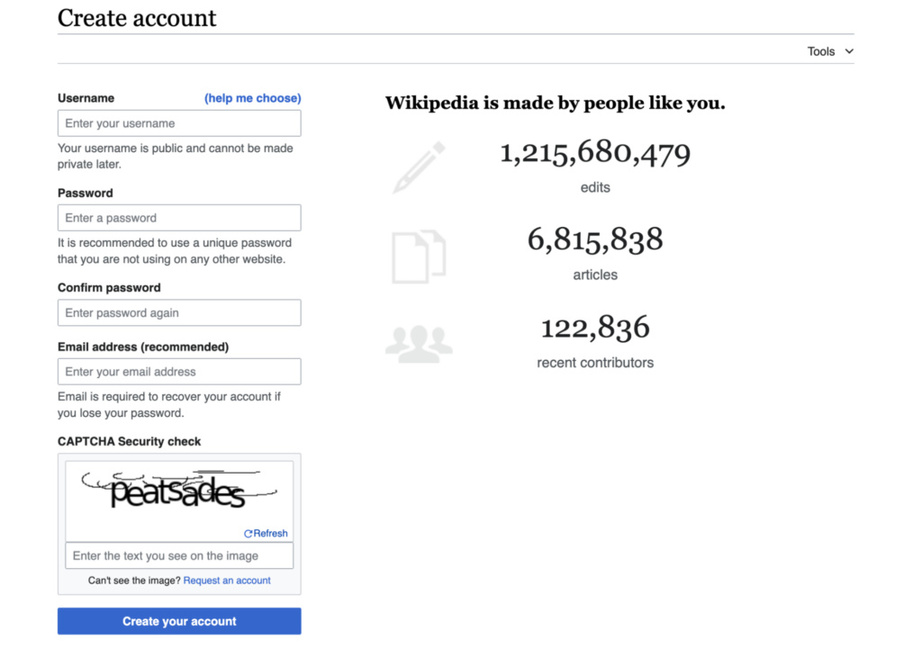
The account creation form.
Visual Editor vs. source editing
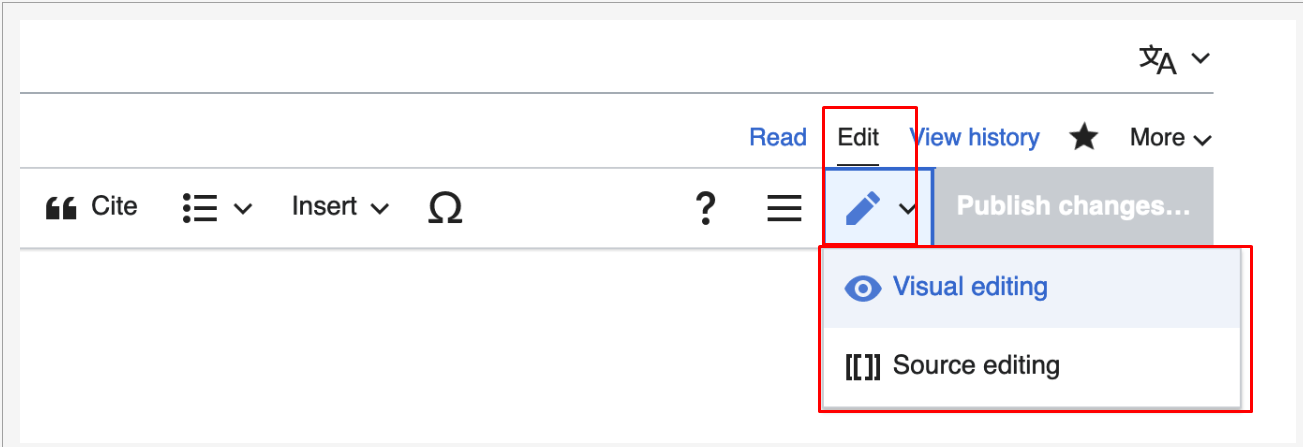
Edit opens VisualEditor, like a word processor. Edit source opens wikitext. Use the toolbar’s pencil icon to switch. Beginners should start with VisualEditor.
The Edit and Edit source tabs.
The Visual Editor toolbar, left to right.
↩️
Undo / Redo — step back and forward through your changes.

Paragraph menu — Place your cursor in a paragraph to choose normal text, a heading, or a subheading.
🅰️
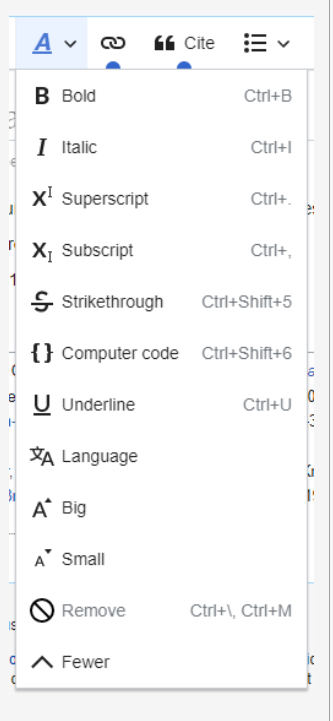
Text style (A) — Bold, Italic, Superscript, Subscript, Strikethrough, Code, Underline, Language, Remove formatting. With nothing selected, the style applies to what you type next.
🔗
Link (chain icon) — internal links to other articles or external links to websites.
Lists and indentation — bullet list, numbered list, decrease/increase indent.
➕
Insert — Add images, tables, templates, and other elements.
Ω
Special character — symbols, diacritics, mathematical characters.
⚙️
Page options (≡) — Categories, Page settings (redirects, table of contents), Advanced settings, Languages, Templates used. Also "Find and replace".
The text style menu.
Publishing
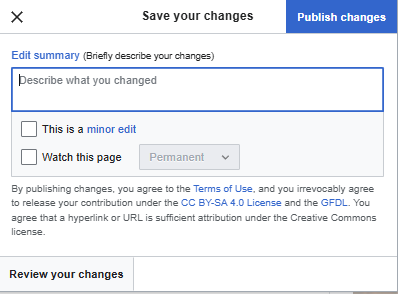
Click Publish changes… (greyed out if nothing changed; to discard, close the tab or click Read). A dialog asks you to:
Summarise your edits — briefly describe what you changed. Always.
Minor edit checkbox — leave it unticked, as recommended by our community, even for spelling, grammar, or punctuation corrections.
Watch this page — tick to be notified of future edits.
Use Review your changes to see a before/after diff before publishing.
The Publish changes dialog.
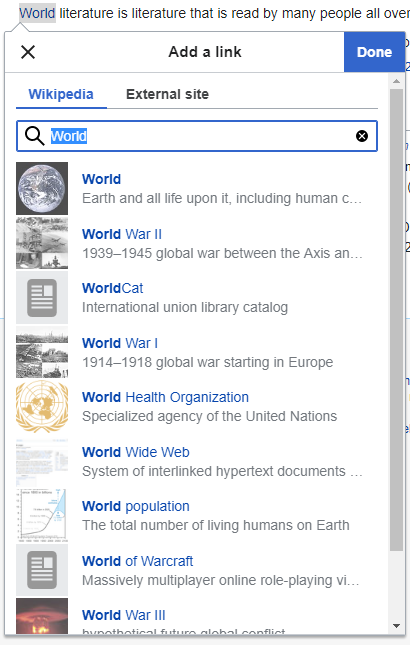
1
Highlight the text you want to turn into a link.
2
Click the chain icon in the toolbar (or Ctrl/Cmd+K).
3
Select a suggested article title, or paste a full URL for an external link.
4
Click Done or press Enter. The text turns blue. Click it again to Edit or Remove.
The link dialog suggests articles as you type.
What to link and what not to: Module 5, Lesson 4.
Automatic
1
Click at the end of the sentence, right after the full stop.
2
Click Cite in the toolbar and choose Automatic.
3
Paste a URL, ISBN (books), DOI (journal articles), or PMID, then click Generate.
4
Check the key fields — title, publisher/website, date, author. If something's missing, click the citation → Edit, fill in the field, Apply changes.
5
Click Insert. A superscript number appears where your cursor was.
6
Publish changes with a summary like "Added citations".
Paste a link, click Generate, check the fields, Insert.
Manual
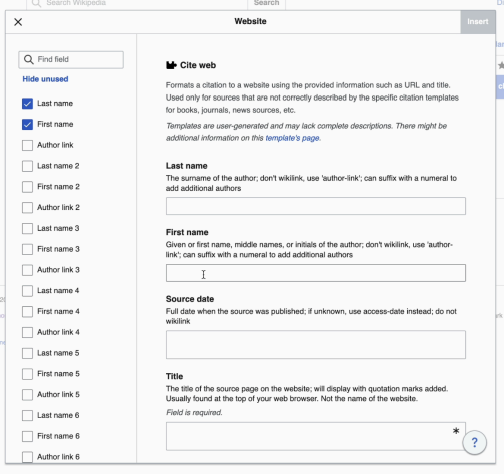
If lookup fails, use Cite → Manual. Choose the source type and enter its details.
Website — fill in
Author last / first name · Date published · Title · Website name · URL · Access date
Book — fill in
Author(s) · Title · Publication date · Publisher · ISBN · Page(s) cited · Edition if several · URL if online
Add or remove fields with the checkboxes on the left. Click Insert.
The manual Website form.
Re-use
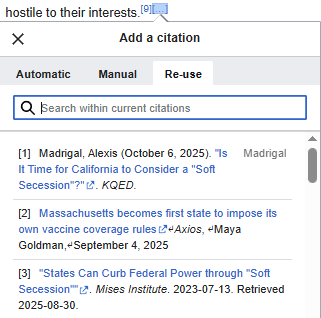
For the same source, place your cursor, choose Cite → Re-use, and select the existing reference.
Re-use lists every citation already in the article.
References section: Wikipedia generates the list automatically. If an article has none yet, place the cursor above the auto-generated list, choose Heading from the Paragraph menu, type "References", and publish.
Inserting an image from Commons
1
Place the cursor where the image should go.
2
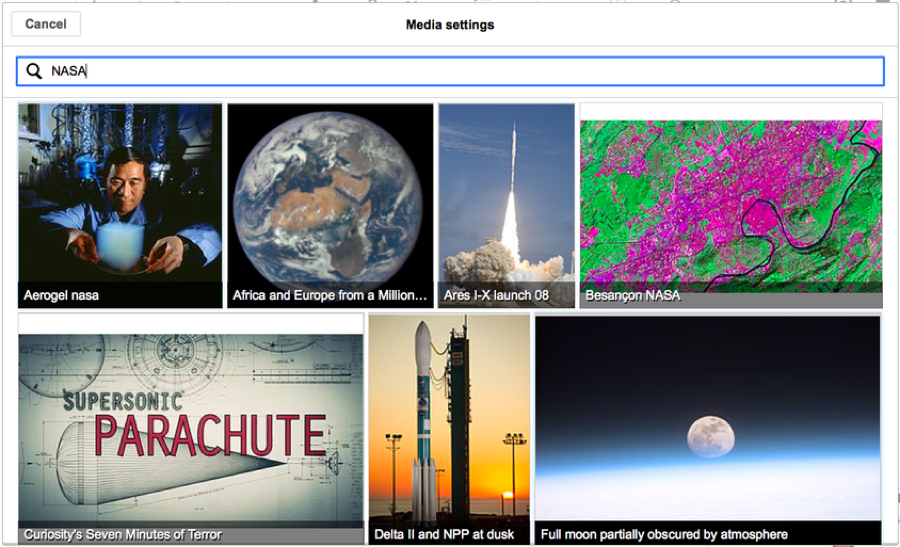
Insert → Images and media. The dialog searches Wikimedia Commons for files related to the page title; change the keywords if needed (try other languages too).
3
Click a thumbnail, then Use this image.
4
Write a caption that connects the image to the article, and alt text for screen-reader users. Apply changes.
The media dialog searches Commons automatically.
Click an image to edit it. Advanced settings controls alignment, display type, and size.
Uploading your own image
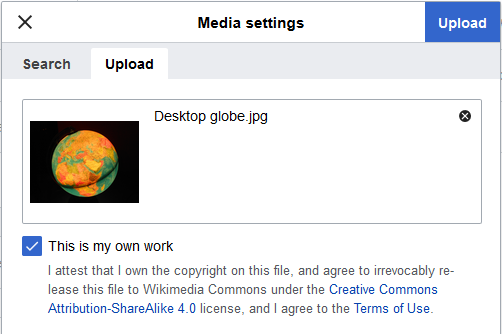
For this beginner workflow, upload your own original work—not copied artwork or copyrighted characters. Open Upload, select the file, add its description and categories, then Insert.
The Upload tab.
Galleries
Choose Insert → Gallery. Add each file and caption; select an existing gallery to edit it.
Licensing and categories in depth: the Commons module.
Lists
Choose Bullet list or Numbered list. Press Enter for another item, Tab to indent, and Shift+Tab to outdent.
Tables
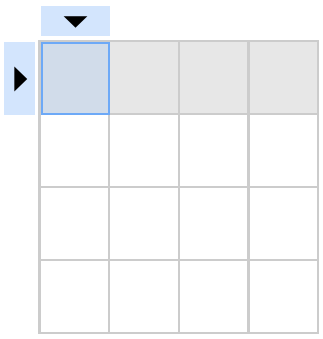
Choose Insert → Table. Double-click a cell to edit it. Use the Table menu for captions, rows, columns, or merging cells. Check for lost text after merging.
The Table menu.
Categories
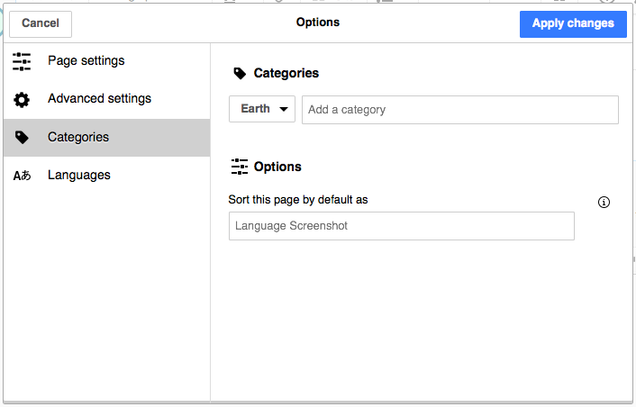
Open Page options (≡) → Categories. Search and select a suitable category; remove it with the trash icon. Sort keys control alphabetical placement.
The Categories dialog.
Page settings
Page settings controls redirects and other page behaviour. Change these options only when needed.
Σ
Math formula — Insert → Math formula. Type LaTeX; the preview updates live. Insert. To edit, click the formula then the Σ icon.
🎵
Musical notation — Insert → Musical notation. Enter notation in ABC or LilyPond format; optionally link an audio/MIDI file. Double-click existing notation to edit.
🗺️
Map — Insert → More → Map. Set the area, add markers, and choose a caption. Select an existing map to edit it.
The free media library every Wikipedia draws from. Learn what you can upload, how licensing works, how to add images to articles well, and how to measure their reach. Adapted from Wiki Education's Commons training.
Wikimedia Commons stores freely licensed and public-domain media. Upload a file once and it can illustrate Wikipedia in many languages.
📸
Who contributes — mostly content creators and uploaders — photographers above all (about 90% of files are photos) — and content curators who categorise, describe, and clean up. Contributions from cultural institutions (galleries, libraries, archives, museums — "GLAM") are especially welcome.
🌍
An international community — many Commons contributors don't speak English. Be patient; plain language helps.
📜
Everything must be freely licensed — public domain or a free Creative Commons licence (next lesson). Images you want in a Wikipedia article must be uploaded to Commons first.
✏️
No Visual Editor — editing on Commons (descriptions, categories) is done in source editing. It's simpler than it sounds — mostly [[Category:…]] lines.
Conflict of interest: Commons vs. Wikipedia
You can upload eligible media connected to your institution on Commons. On Wikipedia, disclose conflicts of interest and ask independent editors to review proposed article changes.
A free licence permits reuse, including commercial use, under its conditions. Commons accepts qualifying free licences and public-domain works. Confirm you have the rights before uploading.
Licences you'll see
Licence
Meaning
Allowed on Commons?
CC BY-SA
Attribution + Share-Alike: anyone may use, copy, share, modify — if they credit the author and release derivatives under the same licence. Commons' default.
✓
CC BY
Attribution only: credit required; derivatives can use any licence. Recommended for your own photos (CC BY 4.0).
✓
CC0
No restrictions at all; no credit required.
✓
Public domain (PD)
Not covered by anyone's copyright — expired, or released with no restrictions (e.g. many government works).
✓
CC BY-NC (non-commercial)
Forbids commercial use. Wikipedia content may be sold (in textbooks, for example).
✗
CC BY-ND (no derivatives)
Forbids modification. Commons can't promise that.
✗
"All rights reserved", "free for personal use", no licence stated
Ordinary copyright.
✗
Public domain — tips that save you trouble
No copyright notice ≠ not copyrighted. A copyright notice ≠ copyrighted either ("copyfraud" exists).
Older than the internet ≠ public domain. In the US, works published 96+ years ago are PD; elsewhere rules differ — see Help:Public domain.
Copyright is transferable: the author being dead doesn't mean the work is free.
Freely available ≠ free to use. Celebrity publicity shots are usually not PD.
Course recommendation: use authentic photos or checked illustrations rather than AI-generated images. This is not a blanket Commons prohibition.
Finding free images elsewhere
Search Openverse, Flickr, or government archives. Always check the original file’s licence and Commons eligibility.
Select or drag in your file(s). JPG for photos, PNG/SVG for diagrams; upload at full resolution.
3
Release rights: "This file is my own work" → choose a licence (CC BY 4.0 or CC BY-SA 4.0). For someone else's PD/CC work, choose "not my own work" and give the source URL, author, and licence exactly as stated there.
4
Name the file descriptively (next section). Describe what it shows, where, when. Add the date taken.
5
Add at least one category (Lesson 5). Publish.
Naming files
❌ Unhelpful
IMG_4821.jpg
photo1.png
Untitled (3).jpg
✓ Descriptive
Edinburgh Castle from Princes Street, 2024-03-12.jpg
Marie Curie laboratory Paris 1921.jpg
Mycorrhizal fungi diagram (English).svg
Names can't be changed easily after upload, so include what, where, and when. Avoid special characters.
After uploading
Check the uploaded file’s description, licence, and categories. In VisualEditor, choose Insert → Images and media, find the file, and add a relevant caption.
Check rights first. Finding an image online does not grant permission. Copyrighted artwork and screenshots need particular care. Ask the Commons Help desk if unsure.
What role will the image serve?
🖼️
Illustrative / representational — showing what something looks like (a type of historical coin).
📜
Documentary / evidentiary — a primary source in itself (a photo of miners during the Gold Rush).
📊
Explanatory — diagrams and infographics.
↔️
Comparative — before/after, then/now.
Things to keep in mind
Wikipedians are cautious about images: they won't remove good ones without reason. But be bold — if your image is higher quality or fills a gap, add it or make the swap. Done well, it's an improvement editors welcome.
Questions about an existing image? Leave a message on the Talk page before replacing it.
Don't overload. Images should be relevant and proportionate to the article's length — one is usually enough for a stub. Well-developed articles may use a gallery.
Always add a caption connecting the image to the article or section, and alt text.
Lead images
The lead image appears at the top or in the infobox. Check talk-page discussions before replacing it; explain how your choice improves the article.
⏸ Pause before replacing
A recent, flattering, in-focus headshot with no pixelation or obstructions. If you have a more recent but lower-quality photo, consider placing it in the body instead.
✓ Good candidate for replacement
Blurry, tiny, decades out of date, obstructed, or a low-quality crop — often the only free image available at the time. New Commons uploads aren't always added to articles promptly.
When should you go ahead and replace a lead image without discussing first?
Add at least one relevant category to each file so others can find it. Categories also support usage tracking.
Finding the right category
Search Category:Your term and check similar files. Try alternative names before creating a category to avoid duplicates.
Adding a category
🔥
HotCat (easiest) — enable the gadget in Commons Preferences → Gadgets. Then on any file page, click (+) next to Categories to search and add, (−) to remove. About HotCat
📝
Source editor — click Edit on the file page and add [[Category:Sample Category]] at the end. Edit summary "added category". Publish. You can also add categories during upload.
🆕
Creating a new category — only when you're sure none fits. Add [[Category:New Name]] to the file; it appears as a red link; click it and create the category page, giving it a parent category so it's not orphaned. Keep names descriptive but concise. Commons:Categories
🌳
Subcategories — keep big categories manageable: an institution's category might have subcategories for exhibits, periods, genres. Mirror how existing categories are organised.
Template — categories in a file's source
[[Category:Edinburgh Castle]]
[[Category:Photographs taken in 2024]]
[[Category:Uploaded by Wikipedians community]]
GLAMorgan uses Commons categories to report where images appear and the pageviews of those pages.
1
Open GLAMorgan. Enter a category (e.g. the one you created for your community's uploads), a month, and a year.
2
Click Get file usage data. Smaller, focused categories return faster.
3
Overview: total images in the category, how many are used in articles, total views that month.
4
Per image: its view count, which pages it appears on, and views per page — click through to see it in context.
5
Bottom of the table: which wikis use the images most (e.g. "48 uses on English Wikipedia, 44 on Wikidata").
Measurable impact
Group community uploads in a Commons category to report their reach alongside your editing activity.
The structured-data backbone of every Wikimedia project — and of much of the internet. Learn how it's built, how to evaluate and add data, how to query it, and where its community lives. Adapted from Wiki Education's Wikidata professional development training.
Definition
Wikidata is an open, multilingual, structured knowledge base that can be read and edited by both humans and machines.
🔓
Open — everything is CC0 (public domain). Both the data and the data structures are free to use, share, and remix — which is why so many tools, and AI systems, build on it.
🌐
Multilingual — data entered in any language is immediately available in all others. The underlying data is language-agnostic; only the labels change. Editing in any language is encouraged.
🧩
Structured — it records not just facts but the relationships between them, so it can be searched in a structured way.
🤖
Machine-readable — every item has a unique Q-number. Wikidata holds 220 name variants for the former Libyan leader, but they all point to one Q-number, so there's no confusion. Siri, Alexa, and Google pull answers from it; bots edit it.
Why it matters to Wikipedia
Wikidata lets language editions share structured facts. A university’s enrolment figure can be updated once and reused wherever that item supplies the data.
Facts, not context
Wikipedia: "Marie Skłodowska Curie (7 November 1867 – 4 July 1934) was a Polish and naturalised-French physicist and chemist who conducted pioneering research on radioactivity." Wikidata expresses that as statements:
Item
Property
Value
Marie Curie
occupation
physicist
Marie Curie
occupation
chemist
Marie Curie
field of work
radioactivity
Wikipedia explains subjects in prose. Wikidata stores structured statements and connects records across databases.
Quick quiz
Wikidata is multilingual. That means…
Databases organise searchable information. Each Wikidata item has a unique identifier and structured statements.
Identifiers
Names can be ambiguous; unique identifiers distinguish subjects. Wikidata also identifies relationships, so software can connect a city, its country, and its status as a capital.
Linked data
Linked data connects subjects and relationships. A query can retrieve matching records—for example, cities whose recorded current mayor is a woman.
✓ Advantages
Mass editing with standard formats (RDF)
Multiple data models can coexist — even conflicting values
Fast to edit, query, update
Linking makes related things discoverable in a click
⚠ Disadvantages
Inconsistent schemas and ontologies confuse everyone
Complex to learn and maintain
Much data isn't linked yet
With no fixed schema, trust matters — which is why references are central
Open data ≠ linked data. A PDF can be open without being linked; linked data can live behind a password. Wikidata is both — CC0 and linked — which is what makes it powerful.
Quick quiz
Wikidata has…
🅀
Item (Q-number) — A subject with a unique ID, such as Earth (Q2). It has a label, a distinguishing description, and alternative names (aliases).
🅿
Property (P-number) — a specific relationship connecting an item to a value. "instance of" is P31; "educated at" is P69; "population" is P1082. A property always takes a value: text, a number, a date, or another item.
🔺
Statement — item – property – value. "Uruguay (Q77) · instance of (P31) · sovereign state (Q3624078)". This triple is the core of Wikidata; it's a sentence in Wikidata's language.
🔖
Qualifier — extra detail on a statement: population in which year; educated at St John's College from 1971 to 1974, degree BA.
📎
Reference — where the statement comes from. Every statement should have one. "Population of Uruguay was 3,383,486 in 2011 — stated in: World Bank Database."
🪪
Identifier — a property linking to the same entity in another database: VIAF, Library of Congress ID, ISNI, IMDb ID, ORCID… Found at the bottom of an item. This is what makes Wikidata a hub for 700+ databases.
⬆️
Rank — when a property has several values (population over the decades; conflicting death tolls), rank marks one as preferred (up arrow), the rest normal, or a bad one deprecated (down arrow) — without deleting history.
Where to learn how a property or item should be used
Check the Discussion tab for property guidance, examples, and constraints. Use it to ask about modelling choices.
What belongs in Wikidata
Wikidata has its own notability rules. Items may qualify through valid sitelinks, clearly identifiable subjects with serious public references, or a structural need connecting other items.
Data ethics: use references and protect personal privacy. Wikidata has gaps and biases; do not assume its records are complete or correct.
Quick quiz
A city's item gives its population in 2000. You have a 2017 estimate. You should…
The ecosystem
The Wikimedia Foundation hosts the projects; Wikimedia Deutschland develops Wikidata. Independent organisations and communities provide editor training.
Editors and etiquette
Anyone who edits joins the community. Expect others to revise your work, just as you revise theirs.
Be civil and polite, even in disagreement. Assume good faith.
One account, one person. Speak for yourself.
You may edit items about yourself and people you know on Wikidata — accurately, and avoiding anything controversial.
Discuss content, not people. No personal attacks.
Disagree with a change? Don't just revert it back — that's edit warring and can get you blocked. Talk.
Most Wikidatans aren't native English speakers. Plain English and patience go a long way.
Where to talk
💬
Discussion pages — every item, property, and user has one — but they're used far less than Wikipedia talk pages.
☕
Project chat — the central place for questions, issues, and updates, with links to Property proposals, noticeboards, and request pages. Wikidata:Project chat
🧑🤝🧑
WikiProjects — discipline-based groups, the place for data models (Lesson 8).
👤
User talk — leave a message on another editor's Discussion page; sign with ~~~~.
How to help
Improve missing or unclear data, document your changes, and invite feedback. Discuss disagreements respectfully and seek consensus.
Six questions for any item
1
Is each statement accurate?
2
Does it have at least one reference? (Wikidata allows unreferenced statements; that doesn't make them good.)
3
Does it follow the data model for this type of item?
4
Are properties missing? Models go out of date; you can spot gaps.
5
Should statements have qualifiers or ranks? Are values up to date?
6
Is it represented across languages — labels, descriptions, aliases, sitelinks?
Sources on Wikidata
✓ Good references
Independent of the subject
Known for fact-checking: academic presses, peer-reviewed journals, newspapers
Reliable publishers representing field consensus
✗ Poor references
Blog posts and social media
Press releases, promotional material
Self-published or unverifiable sources
Conflicting values can coexist with references, qualifiers, and appropriate ranks. Preserve what each source actually says.
Other evaluation tools
⭐
Showcase items — well-referenced items with 10+ statements, sitelinks, and multilingual labels. Use as templates. (Ten statements is a floor, not a target.)
🕓
View history — Select two versions and click Compare selected revisions to see changes.
🎮
Games and gap-finders — Mix'n'match (match external database entries to items), The Wikidata Game and the Distributed Game (fill in missing dates, descriptions, images), WikiShootMe (items near you with no photo), Terminator (missing labels across languages), TABernacle (compare properties in a table).
Quick quiz
Which is the best reference for a statement about a person on Wikidata?
Pick an item you know something about — the town you grew up in, your school, a favourite book. Your Wikipedia login works on wikidata.org.
Adding a statement
1
On the item, click + add statement. Start typing a property; Wikidata suggests as you type. "instance of" and "subclass of" are the two most common.
2
Type the value; pick from the suggestions. If the value is a thing, it must itself be an item. "No match was found"? You may need to create it (Create a new item in the left menu: label, description, then statements).
3
Publish, then check for ! or ? constraint warnings. Open each warning and resolve the issue.
Adding a reference
Your statement says "0 references". Fix that. Click + add reference and use one of the common reference properties:
🔗
reference URL (P854) — paste the URL. Add retrieved (P813) with today's date.
📖
stated in (P248) — for a database, book, journal or newspaper article. The source must exist as an item; if not, create one (bibliographic items use properties like author, title, publisher, date — see WikiProject Books). Add page numbers with page(s) (P304).
Follow your WikiProject’s data model. If none exists, inspect a similar well-developed item and check which properties apply.
🧭
Recoin — a gadget that lists "most relevant properties which are absent" at the top of any item, with a completeness indicator. Enable it: Preferences → Gadgets → tick Recoin → Save. Click + beside a missing property to add it directly. Balance its suggestions with your own expertise — every item is unique.
Try it without risk
Wikidata's guided tutorials let you practise adding labels and statements without saving anything: Wikidata:Tours.
Quick quiz
You should add statements to Wikidata items…
Queries find records matching your criteria across Wikidata’s items.
Click Examples (or the folder icon). Choose the first one: Cats.
2
Click the blue ▶ Run button (bottom left). You get two columns: item (Q-numbers) and itemLabel (names).
3
Click the ⓘ Query Helper. Next to "house cat", click the arrow, type "dog", choose dog (Q144). Run again. You've just written a query without touching SPARQL.
#Cats
SELECT ?item ?itemLabel
WHERE {
  ?item wdt:P31 wd:Q146 .
  SERVICE wikibase:label { bd:serviceParam wikibase:language "[AUTO_LANGUAGE],en". }
}
#
#Cats — a comment; ignored.
🎯
SELECT ?item ?itemLabel — what to return. ?item is a variable (you choose the name). ?itemLabel is special: the human-readable label for each item.
🔍
WHERE { … } — the conditions that fill the variables.
🔺
?item wdt:P31 wd:Q146 . — the core triple: "give me items whose instance of (P31) is house cat (Q146)". wdt: prefixes properties, wd: prefixes items. The full stop ends the clause.
🏷️
SERVICE wikibase:label … — fetches labels in your language, falling back to English.
Try: women mayors, with the city on a map
#defaultView:Map
SELECT ?city ?cityLabel ?mayor ?mayorLabel ?coord
WHERE {
  ?city wdt:P31/wdt:P279* wd:Q515 ;        # instance of (a subclass of) city
        p:P6 ?statement .                   # head of government statement
  ?statement ps:P6 ?mayor .
  FILTER NOT EXISTS { ?statement pq:P582 ?end . }   # still in office
  ?mayor wdt:P21 wd:Q6581072 .              # sex or gender: female
  ?city wdt:P625 ?coord .                   # coordinates
  SERVICE wikibase:label { bd:serviceParam wikibase:language "[AUTO_LANGUAGE],en". }
}
How do you retrieve information from the Wikidata Query Service?
Wikidata WikiProjects coordinate data models, properties, and missing information. Wikipedia WikiProjects focus on article content.
What you'll find on a WikiProject page
📐
Data models — the minimum properties to represent an item of that type, with descriptions and examples. The single most useful thing for a new editor.
🔍
Queries — common, maintenance, and "interesting" queries ready to run.
📋
Guidelines, common properties, standard references, related tools
📊
Completeness tracking and lists — e.g. WikiProject Universities shows what percentage of items have each property; Every Politician lists what exists and what's missing per country.
✅
To-do lists — where help is needed. Pages vary a lot — each project is volunteer-run and best practices are still emerging.
Joining
Find a WikiProject. Follow its joining instructions or introduce yourself on its Discussion page.
Contributing to the ontology
Wikidata’s structure develops through community consensus. You can:
Propose a data model on a WikiProject's Discussion page — anyone can; describe your logic so others can follow.
Propose a property that doesn't exist yet, specifying data type, domain, and constraints. Proposals go through community review to avoid duplicates and ensure sound formatting.
Discuss a property's definition on its Discussion page if it doesn't express a relationship the way it should.
Quick quiz
You visit a WikiProject and there's no data model for your kind of item. You should…
Activities
Look up the Wikidata item for a city you've lived in: what's there, what's missing, what identifiers does it have? Join one WikiProject. Add one sourced statement with Recoin. Run one example query and change one value in it.
Find a publication or paste a sentence to look for relevant passages in your uploaded collection.
A match is a research lead, not proof. Read the original page and evaluate reliability, context, and significant viewpoints. Uploaded summaries and quotation notes are labelled separately from publication text. PDF page numbers count from the first file page; check the printed page number before citing.